OCR languages
OCR PDF reads 8 languages. Pick the one your document is written in before you press Make searchable.
| Language | Tesseract code |
|---|---|
| English | eng |
| German | deu |
| French | fra |
| Spanish | spa |
| Italian | ita |
| Portuguese | por |
| Dutch | nld |
| Latin | lat |
Why the setting matters
The OCR engine, Tesseract.js, loads a trained model for one language. The model knows that language’s letters and common words, so it can tell é from e, or ß from B.
What the wrong language does
We read one page of an 1885 German medical book, Ueber Doppelfracturen der langen Knochen (public domain), twice with Tesseract 5: once with the English model and once with the German one.
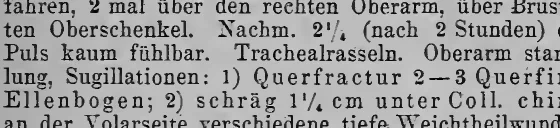
| Printed | English model | German model |
|---|---|---|
| über | iiber | über |
| über-fahren | itber-fahren | über-fahren |
| fühlbar | fiihlbar | fühlbar |
| schräg | schrag | schräg |
| Schwel-lung | Schwel-Jung | Schwel-lung |
Across the whole page, 16 words have an ä, ö, ü or ß. The English model got none of them right; the German model got all 16. In a searchable PDF made with the English model, a search for “über” finds nothing on that page. The German model slipped once too, reading a smudged “und” as “ünd”, which is why it is still worth checking key words.
If a document mixes languages, pick the one most of the text is in. Names and short quotes in another language usually still come through.
When you choose a language
The first time you use a language, your browser downloads its model from a public file server, and then keeps it for next time. Your PDF is not part of that download and is never sent anywhere.
Other languages and scripts
Tesseract itself has models for many more languages, including Greek, Russian, Arabic, Chinese and old German Fraktur type. They are listed on Tesseract’s language data page. This site keeps to 8 so the page stays fast. For a whole scanned book in Fraktur or Ancient Greek, FixMyScan reads both and spots the script on its own.
Pick your language and make your PDF searchable.
Start