Scanned PDF to text
Run the PDF through OCR PDF and press Download the text. You get every word as a plain text file, and a copy of the PDF where you can select and copy text in place.
Updated 12 November 2026
Key takeaways
- A scanned PDF holds pictures, which is why copy and paste gives you nothing.
- OCR reads the pictures and gives you two things: a .txt file and a copyable PDF.
- Check names, numbers and quotes against the page before you rely on them.
Two ways to get the text
All of it, as a file
After the pages are read, the result card shows Download the text too. That saves one .txt file with the pages in order. Use it to paste into notes, feed a translation tool, or search across many documents on your computer.
A bit of it, from the page
The searchable PDF you download lets you drag across a sentence and copy it, the same as a PDF made on a computer. This is better when you need a quote and want to see it in context.
Get the text out of your scan, free.
Extract the textWhat comes through and what doesn’t
| On the page | In the text |
|---|---|
| Printed words, lines, paragraphs | Yes |
| Accents and letters like ß or ç | Yes, with the right language picked |
| Bold, italics, font sizes | No, it is plain text |
| Tables | As rows of text, not cells |
| Handwriting | Mostly not |
| Pictures and diagrams | No |
Checking the text
OCR guesses each letter from its shape, so some guesses are wrong. The usual suspects: l and 1, O and 0, rn read as m, and words split by a hyphen at the end of a line. Before you quote, cite or file anything, read the key lines against the page. Search the text for a word you know is there; if it is missing, that page is the one to check.
A real example
We ran a page of the 1901 Alice’s Adventures in Wonderland (public domain) through Tesseract 5, the engine this site runs in your browser (we used its desktop version). The page is clean, with plain type and good contrast, and the text came out almost perfect. Two things still needed fixing.

nave liked teaching it tricks very much, if—if I’d
The h at the start of “have” is worn on the page and looks like an n, so the text says “nave”. A spell checker catches this one; a real word in the wrong place (“form” for “from”) it won’t.
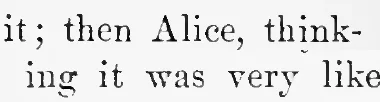
heels in its hurry to get hold of it; then Alice, think-
ing it was very like having a game of play with a
The book splits “thinking” across two lines, and the text keeps the split. Search the text for “thinking” and this one is missed.
Joining words split at line ends
In any editor that supports regular expressions (VS Code, Sublime Text, Notepad++, BBEdit), find -\n and replace it with nothing. That joins “think-” and “ing” back into “thinking”. Check the result: real hyphenated words that happen to break at a line end, such as “fish-oil”, get joined too.
If the scan is poor
Grey backgrounds, shadows at the spine and crooked pages are where most errors come from. If you made the scan, rescanning at 300 dpi in black and white or greyscale helps more than anything else. If you can’t rescan, FixMyScan cleans the pages before reading them.
Questions
Why can’t I copy text from my scanned PDF?
Because there is no text in it yet, only a photo of each page. Your PDF reader can select images but not letters. OCR adds the letters.
What format is the text file?
A plain .txt file in UTF-8, so accents and other characters survive. Any text editor, Word or Google Docs opens it.
Does it keep paragraphs and columns?
Lines and paragraph breaks come through. Two-column pages are read column by column in most cases, but tables become plain lines of text.
Can I get a Word document instead?
Not from this site. Open the .txt file in Word and save it as .docx, or use Google Docs, which turns a PDF into an editable document directly.
How do I copy just one paragraph?
Make the PDF searchable here, open it in your usual PDF reader, then drag across the paragraph and copy it like any other text.